
Common AI System Integration Challenges and How to Solve Them
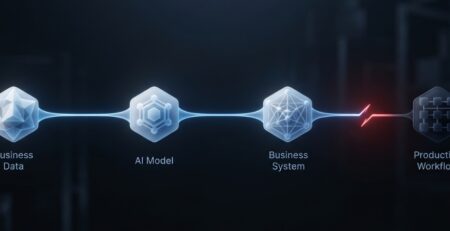
Most AI failures inside a company have nothing to do with the model. That’s the kinda uncomfortable bit for a lot of leadership teams, who’ve spent the last two years chasing pilots. The model does what it was built for, and it kinda keeps doing it. What falls apart is everything around it, like the transfer to the CRM, the stale entries sitting in the ERP, the API that starts to time out under real load, and the workflow nobody ever mapped in full before deciding to automate it. AI system integration is where strategy meets the actual technology stack, and it’s rarely as simple as plugging a tool into an existing environment.
This matters because the gap between “we deployed AI” and “AI is actually driving results” is, like, almost always an integration gap, not so much a model quality gap. Even a capable model, if you wire it into some brittle, disconnected system, will end up underperforming a mediocre model that’s wired into a clean one, every single time. This piece walks through the AI system integration challenges that show up the most in enterprise settings: technical data security workflow and scale, and also what a defensible path through those issues looks like.
Why AI System Integration Can Be Challenging
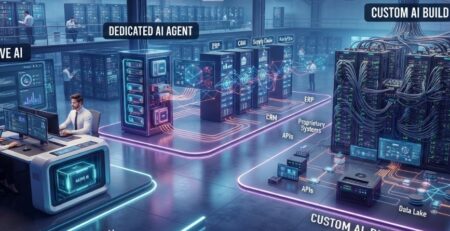
Enterprise environments weren’t really built with AI in mind, and that’s kind of the root of most of this. A company running a fifteen year old ERP alongside three CRMs from three separate acquisitions doesn’t have one single system to integrate against; it has this patchwork. You know each part carries its own assumptions about data format, authentication, and how often updates show up.
Put layer A I on top of all that, and a few things kinda surface pretty fast: legacy infrastructure that was never really built to expose clean APIs, data scattered across multiple platforms that don’t talk to each other, technical architectures that don’t share the same common language, and business processes that were built for humans with judgment calls not for a model consuming structured inputs and then producing structured outputs. None of this is a reason to avoid AI system integration. It’s the reason to understand the AI system integration challenges upfront and plan for them deliberately, instead of treating integration as an afterthought to a model selection decision.
Common AI System Integration Challenges and How to Solve Them
1. Integrating AI With Legacy Systems
Older applications kinda weren’t built with an API-first mindset, so when you try to expose their data to an AI layer, you end up working around limitations that honestly didn’t show up in newer platforms. You get rigid data schema, no webhook support or the sort, and authentication methods that predate modern OAuth standards, so it feels more fragile than you’d expect.
The workable path here is rarely “replace the legacy system.” It’s middleware and integration layers that sit between the old and new, translating formats, exposing controlled endpoints, buffering the AI enterprise application integration from the legacy system’s quirks. Phased modernization, where the integration layer is built first, and deeper platform changes happen later on a separate timeline, tends to de-risk this considerably compared to a rip-and-replace approach under deadline pressure.
2. Data Quality and Inconsistent Data
An AI system integration challenge is only as good as what it gets fed. If the customer records are incomplete, or you have duplicated entries, old fields, and that kind of unstructured free-text notes, well, the output quality drops in ways that are hard to trace to a single cause after the fact. Then the model looks sort of unreliable, like it’s the AI that’s the issue, when really it’s the input.
Data cleaning, validation checks, and standardization before AI even touches the data isn’t exactly glamorous work, but it’s the highest leverage step in the whole loop. Also, governance still matters: who owns data quality going forward, not only at the moment of integration.
3. Data Silos Across Different Systems
Customer history in the CRM. Support tickets in a separate helpdesk platform. Billing in a finance system that nobody outside finance has access to. When AI can see just one slice of this, its output sort of feels confident, but it is also kind of incomplete, like it knows a lot, even though it doesn’t. This is exactly why proper AI Customer Support Integration matters: without it, you’re stitching together partial answers instead of the full customer picture. Centralized data access via connectors, APIs, or maybe a dedicated integration platform gives the AI system integration a broader picture without having to fully merge every underlying platform, which is usually not realistic, or it’s not really needed right away, in the short term.
4. API and Compatibility Issues
Different systems talk in different technical dialects: REST here, SOAP there, inconsistent authentication schemes, and also third party APIs that quietly put in place rate limits or forbid specific fields entirely. At that point, a bunch of enterprise AI integration projects sort of stall without making much noise.
API gateways and custom connectors absorb this friction. So does building in data transformation layers early, along with compatibility testing that happens before go-live rather than being discovered by end users after.
5. Security and Data Privacy Concerns
When AI starts touching customer records, financial data, or other proprietary business information, security kind of stops being just an IT checkbox and turns into this board level conversation, really quickly. You have to make access control work properly, use encryption both in transit and at rest, and map compliance requirements that are specific to the industry directly into the integration, not like slap them on later. Otherwise it’s a mess, and nobody wants that.
For any enterprise AI data integration hustle, secure APIs, those fine grained permission knobs, plus audit logs that can say what the AI accessed and when it did, are kind of table stakes, especially in regulated places like finance and healthcare.
6. Connecting AI With Existing Business Workflows
A tool can work fine on its own but not really plug into how the business runs; it delivers like, only a sliver of what it could do. This is one of those very common ways AI efforts quietly underdeliver, not because the tech failed, but because it sat near the process instead of inside it, and then someone had to manually copy results from one system into another. That’s often where generic, off the shelf tools don’t quite land, and also where custom AI assistance solutions that are designed around the real workflow end up narrowing the gap.
7. Maintaining Accurate Context Between Systems
AI models are only as useful as the context they’re given; I mean, basically that. Like when a support AI can see a ticket, but it can not see the customer’s purchase history, or when a sales assistant can observe a lead’s activity, but not their contract terms, the result feels kinda thin. Even if the model itself is capable, it still sounds shallow because it’s missing that extra layer, the real texture, if you will.
Shared identifiers across systems, plus structured data mapping, and real time synchronization kinda keep the context intact as information drifts between different platforms. It’s the gap between an AI system that feels actually useful, vs one that keeps fishing for details, as it should already have it, you know.
8. Scaling AI Integrations as Usage Grows
What works cleanly in a pilot with fifty users can behave very differently at five thousand. API request volume keeps climbing, data volume keeps climbing, and the infrastructure that was not built with that scale in mind kinda starts to show performance bottlenecks, slower response times, failed requests, and a degraded user experience.
So, a scalable architecture, plus caching strategies, workload management, and also ongoing infrastructure monitoring really need to be in the plan from the start, not something you try to retrofit after the first outage.
9. Controlling AI Outputs and Automated Actions
The risk profile shifts pretty dramatically when AI goes from just generating ideas and then starts executing actions, updating records, launching workflows, and sending messages. An unexpected output that feels mostly annoying in a chat interface can turn out to be genuinely costly when it’s actually writing to a production database.
Those validation rules, the approval steps for anything higher risk, and having a human in the loop controls at the right checkpoints keep the risk contained, without really taking away the automation value that originally made the project worth doing in the first place.
10. Managing Changes in Third-Party Platforms
AI models get updated. SaaS platforms change their APIs. None of this is really under the enterprise’s control, and it can all quietly derail an integration that was working fine the week before. It’s just, you know, the little stuff like version updates, missing checkpoints, things like that.
That’s why good version management plus automated regression testing, clear documentation, and fallback mechanisms, when some dependency changes out of nowhere, is what keeps the whole integration resilient over years instead of months.
A Practical Approach to Successful AI System Integration
Step 1: Define the business use case
Get really specific about the problem the AI actually needs to solve, and also where integration is genuinely required, not just assumed, like “oh, it should just fit” or something.
Step 2: Audit the existing technology stack
Before any design work starts, applications, databases, APIs, authentication methods, and the current workflows all really need some kind of truthful inventory, like yeah, otherwise you are sorta guessing.
Step 3: Identify the required data sources
Decide exactly what information the AI needs, and how it will pass between different systems, like ok moving states or so. Also be clear on where it begins and where it ends, because otherwise it gets messy.
Step 4: Choose the right integration architecture
Direct APIs, middleware, integration platforms, plus these “ custom integration layers ”, and then event driven architecture all of them seem to land in different spots. The “ right ” choice really hangs on what you already have in your stack, and also on the specific use case, not on whatever is trending right now.
Step 5: Start with a controlled integration
Build around a single workflow, validate data flows and AI behavior, and only then expand.
Step 6: Add security and governance controls
Permissions, data access rules, and clear boundaries on what AI-generated actions are allowed to do.
Step 7: Test the complete workflow
APIs, data accuracy and edge cases, plus the failure scenarios, and what real users do in actual interactions, not only the easy happy-path stuff.
Step 8: Monitor and improve after deployment
Errors, performance, AI accuracy, usage patterns, and workflow outcomes really need ongoing visibility, not that one-time launch check, like once it’s done, you know.
Best Practices for Managing AI Integration After Deployment
Integration performance needs continuous tracking. You know, API response times, failure rates, and synchronization trouble are kind of early tells that the system is slipping, and it gets harder to patch the longer it just runs, unnoticed.
AI behavior deserves regular review too. Outputs that were accurate at launch can drift as underlying data or business conditions change, and automated actions affecting core systems warrant particular scrutiny.
Connected systems require maintenance as a matter of course. APIs, connectors, and authentication methods need updates, and any change on a connected platform should trigger a round of integration testing rather than being discovered through a support ticket.
And real usage data along with direct user feedback should keep shaping refinements to prompts, rules , data sources, and automation logic. Integration isn’t really a thing you finish; it’s more like an operating discipline, something you do day by day.
Building an AI Integration Strategy for Long-Term Growth
The orgs that get ahead of AI system integration challenges early, instead of just reacting when it’s halfway through a rollout, treat integration architecture like a long-term asset, not some one-off technical chore. So you design for extra tools and new workflows later on, rather than bolting things together; also, you try to dodge unnecessary dependencies between systems. And you standardize the way data moves across the whole stack, so every future integration doesn’t begin from scratch, like “okay now what”.
Conclusion: Turning AI Integration Challenges Into a Stable System
AI system integration works best when the focus stays on the whole system, not just the model hanging around the center of it all. Reliable data flows, tied-in workflows, solid security controls, and steady monitoring are the parts that really decide if the integration performs or not, because the model is only one element in that long chain. In other words, it’s not just the brains; it’s the entire ecosystem.
Solving AI system integration challenges early, before scaling to more use cases, is considerably cheaper than solving them after a failure has already touched customers or revenue. Enterprise application integration and enterprise AI integration are engineering disciplines in their own right, and treating them that way from day one is what separates AI initiatives that compound in value from the ones that quietly stall out after the pilot.