AI Customer Support Integration: Native vs Agents vs Custom Build
Customer support teams are kinda under constant pressure to cut response times, keep ticket volume under control, and deliver around-the-clock coverage without ballooning headcount. For most leadership groups, the question isn’t really if to add AI to the support stack anymore; it’s more like which AI integration pattern actually matches the business.
That decision usually comes down to three paths:
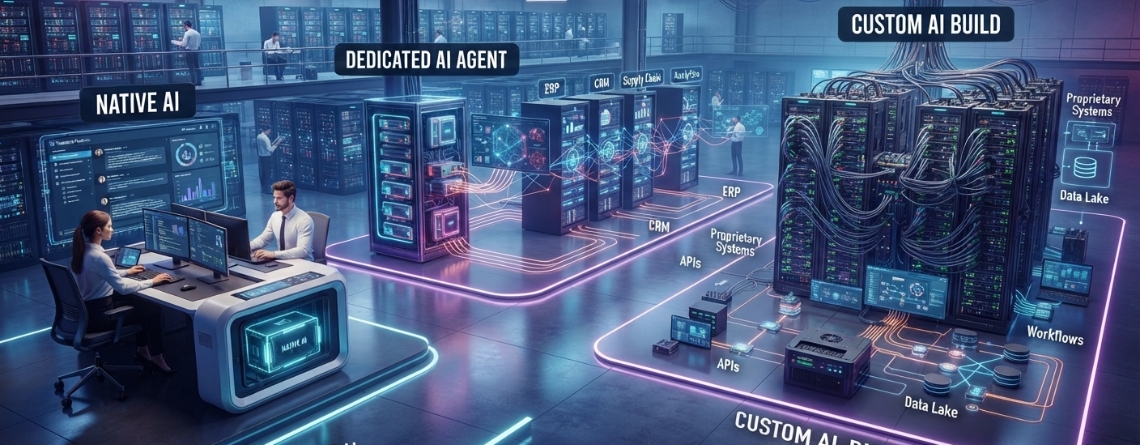
- Native AI built into your existing helpdesk platform
- A dedicated AI customer support agent layered on top of your stack
- A fully custom AI support solution engineered around your systems and workflows
Every choice includes different trade offs for what you can do, how hard it is to wire everything in, what it costs, how much you can tailor, how it scales, and how secure it is. If you get this decision wrong, it’s not only a technical misstep; it ends up shaping ticket economics, customer trust, and vendor dependency for years. In other words, this isn’t really a small call. This guide kinda lays out how the three models of AI Customer Support Integration compare and then walks you toward picking the one that fits your day to day operation.
What Is AI Customer Support Integration?
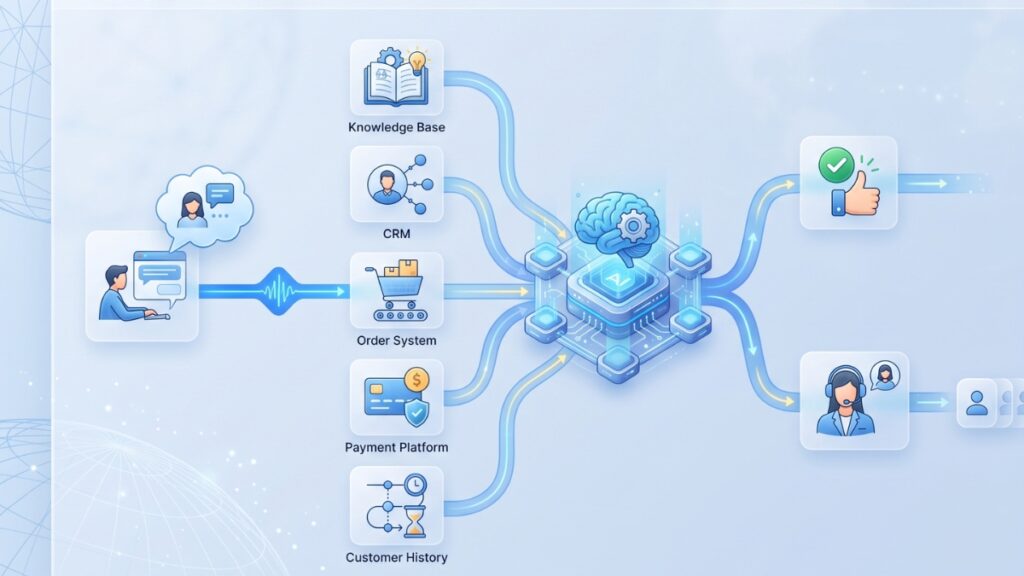
AI customer support integration is basically about hooking up an AI layer, either built in, from a third party, or something you custom-make, into the existing systems that already run your support workflow. The idea is that it can pick up context, do something useful, and then talk back to customers, or even to your agents. How AI connects with your customer support ecosystem
How AI connects with your customer support ecosystem
A functioning AI support integration typically touches:
- Helpdesk and ticketing platforms
- CRM systems
- Knowledge bases
- E-commerce platforms
- Order management systems
- Payment and subscription platforms
- Live chat, email, voice, and social channels
- Internal APIs and business databases
The depth of these connections determines how much the AI can actually do, versus how much it can merely say.
AI assistant vs. AI customer support agent
These terms get used a little loosely, but the distinction does matter when scoping a project, you know.
- An AI assistant or a copilot helps human agents draft responses; it also summarizes tickets and pulls up relevant information. Still, the person on the team stays in the loop for every customer-facing action, always.
- AI support agent integration: communicates directly with customers and can resolve certain requests without human involvement.
- Agentic support system, kinda goes a bit further, using tools and workflows to actually finish tasks like checking an order status, updating an account, or issuing an eligible refund.
Zendesk also draws a similar line, separating customer facing AI agents from agent copilots, which are meant purely to raise human agent productivity. That distinction between assistive versus autonomous is often the real fork in the road when comparing native, dedicated, and custom options.
Native AI vs. Dedicated AI Agents vs. Custom Build at a Glance
| Factor | Native AI | Dedicated AI Agent | Custom Build |
| Setup speed | Fast | Moderate | Slowest |
| Initial investment | Low to moderate | Moderate | High |
| Customization | Limited | Moderate to high | Very high |
| Helpdesk integration | Usually seamless | Requires connectors | Fully configurable |
| Workflow complexity | Basic to moderate | Moderate to advanced | Advanced |
| Platform dependency | High | Moderate | Low |
| Data ownership | Vendor-dependent | Vendor-dependent | Greater control |
| Maintenance needs | Low | Moderate | High |
| Best for | Existing platform users | Scaling support teams | Complex or unique operations |
Detailed Comparison of the Three AI Integration Models
- Implementation time
Native AI configuration can sometimes go live in just a few days; you’re basically flipping a bunch of switches inside a platform you are already paying for. But a dedicated AI agent usually needs some kind of more structured onboarding, like getting data sources connected, letting it learn from your knowledge base, and then setting up escalation logic. That part tends to take from a few weeks to maybe a couple of months or so, depending. Meanwhile, custom builds are usually the slowest route on purpose. They move through discovery, custom AI agent development, testing, then a staged rollout, and yeah, you might be looking at three to six months before it’s really production-ready. If it’s complex or spans multiple systems, it can easily stretch out even more.
- Upfront and ongoing costs
Cost structures differ meaningfully across the three models of AI Customer Support Integration. Native AI usually shows up as part of platform licensing, or it’s priced per seat, and the ability to negotiate around usage is kind of limited. With dedicated agents, it’s common to see per-conversation or per-resolution pricing stacked on top of the platform fee, plus AI model and token costs that rise as your volume rises. If you go with a custom build, the upfront integration work and infrastructure costs are higher, but the ongoing per-conversation fees are often lower or even removed. In that case, the cost center shifts away from raw usage, toward maintenance, monitoring, and the constant keeping the knowledge base in shape, and yeah, that part matters.
- Customization and workflow control
This is the part where the three models kind of diverge really sharply. With Native AI, you usually can only tweak so much the conversation logic, brand voice, or the escalation rules; it feels more like you work inside the platform’s guardrails rather than over them. You know, like the room for maneuver is smaller. Dedicated agents open up more control over model selection, channel experience, and business actions, but still operate within a vendor’s architecture. Custom builds allow full control over conversation logic, escalation rules, reporting, and evaluation frameworks at the cost of owning that complexity internally or through a development partner.
- Integration depth
Native AI integration depth is usually kinda limited by what the parent platform offers, right out of the box. Dedicated agents more or less ship with pre-made connectors for usual CRM, e-commerce, and payment systems, but if it falls outside that menu, then you’re looking at custom connector work, with that extra effort. AI customer support solution builds can still reach into ERP systems, logistics providers, identity and authentication layers, and proprietary internal APIs any place a connection is technically feasible, you know.
- Data security and compliance
Every model requires scrutiny here, but the questions differ. With native and dedicated choices, you are kinda depending on how the vendor actually stores data, trains models, sets access controls, and keeps audit logs; so do your due diligence by reading the contract carefully, not only the sales deck. Custom LLM customer support builds put things like data residency, role based permissions, and PII management more directly under your own control, and that matters a lot for regulated industries, but also it means your organization ends up owning the compliance work, instead of basically shifting it to the vendor.
- Scalability and performance
Native AI scales as far as the parent platform allows; additional languages, channels, or knowledge base size may hit platform-level ceilings. Dedicated agents are generally built to scale across ticket spikes and new channels, since that’s their core value proposition, though scaling to multiple brands or business units can require additional configuration. Custom builds scale exactly as far as the architecture was designed to, a real advantage for multi-brand, multi-region operations, provided the initial engineering accounted for that growth.
How to Choose the Right AI Customer Support Integration
Start with the type of support requests you receive
Break your ticket volume into categories:
- Informational requests
- Account-specific questions
- Transactional requests
- Technical troubleshooting
- Sensitive or high-risk requests
A support queue dominated by informational questions is a very different automation problem than one full of transactional or high-risk requests.
Evaluate your existing technology stack
- Before comparing vendors, get honest answers to:
- Which helpdesk and CRM do you currently use?
- Does your platform already include usable AI features?
- Are the APIs you’d need actually available?
- Is customer data centralized, or scattered across systems?
- Can the AI access real-time business information, or only static content?
Determine your required automation level
Think of automation maturity as a scale rather than a binary:
- Agent assistance
- FAQ deflection
- Ticket triage
- Guided resolution
- Transactional automation
- End-to-end autonomous resolution
Most organizations shouldn’t aim for level six on day one. Mapping your current position on this scale clarifies which model native, dedicated, or custom matches your actual ambition, not just your budget.
Calculate total cost of ownership
A useful working formula:
TCO = software fees + AI usage costs + integration costs + maintenance + internal staffing + monitoring and governance
Vendors rarely volunteer the full picture here. Model this out over 18–24 months, not just the first quarter, since usage-based pricing on dedicated agents can shift the economics considerably as volume grows.
Assess risk and compliance requirements
Before committing to any model, get clear answers to:
- What actions is the AI actually permitted to perform?
- Which requests require human approval before execution?
- What data can the agent access, and under what constraints?
- How will incorrect responses be detected?
- How quickly can a conversation be escalated to a human?
Run a focused proof of concept
Rather than attempting an enterprise AI agent development-wide rollout immediately, scope a proof of concept around:
- One channel
- One customer segment
- Three to five high-volume intents
- Clear escalation boundaries
- A controlled, limited set of API integration permissions
- Defined success metrics agreed upon in advance
This approach surfaces integration gaps and workflow issues while the blast radius of a mistake is still small.
Decision Matrix: Which Option Is Best for Your Business?
Choose native AI when:
- You need a fast implementation
- Most requests are informational
- Your existing helpdesk is already the center of your support operation
- Integration requirements are limited
Choose a dedicated AI agent when:
- Native AI can’t handle your workflows
- You need stronger automation across several connected systems
- You want to deploy without building the entire platform internally
- You need more helpdesk flexibility than native tools provide
Choose a custom build when:
- Your workflows are highly specialized
- The AI needs to interact deeply with proprietary systems
- Security and data control are non-negotiable
- You need architectural and long-term cost control
- Support automation is itself a competitive differentiator
Consider a hybrid approach when:
- Native AI handles internal agent assistance
- A dedicated agent resolves common, high-volume customer requests
- Custom workflows handle complex or high-value cases
- Human agents remain responsible for exceptions and sensitive interactions
In practice, many mature support organizations land on a hybrid model rather than a single pure approach.
AI Customer Support Integration Process
Step 1: Support workflow discovery
Look into the whole set of ticket categories, then spot the repetitive stuff that comes up again and again, not just the big themes but the small routines too. After that, map out the escalation paths, like who goes where, when it gets more complex.
Step 2: Data and knowledge preparation
Clean up help-center content, remove contradictory information, structure policies clearly, define authoritative data sources, and set access permissions.
Step 3: Platform and architecture selection
Choose native, dedicated, custom, or hybrid, grounded in what the discovery phase actually revealed, not in vendor preference.
Step 4: System integration
Connect the AI layer to the helpdesk, CRM, knowledge base, customer authentication systems, order and billing platforms, and relevant internal APIs.
Step 5: Guardrails and human handoff
Ok so set up what actions are restricted, plus the confidence thresholds, then the approval requirements, and also how we detect sensitive topics, because you know, when something feels risky, we need escalation rules that are clear and not hand-wavy.
Step 6: Testing and evaluation
Test for answer accuracy, policy compliance, correct tool execution, edge-case handling, resistance to prompt injection, escalation quality, and appropriate conversational AI tone.
Step 7: Controlled deployment and optimization
Start by rolling out with a small set of use cases, then go back and review the failed conversations closely. From there, refine the knowledge sources, improve the workflow paths a bit, and expand the automation gradually, not all at once.
Metrics for Measuring AI Customer Support Success
A credible measurement framework balances automation efficiency with actual customer experience:
- AI resolution rate
- Containment rate
- Ticket deflection rate
- Escalation rate
- First-response time
- Average resolution time
- Cost per resolution
- Customer satisfaction score
- Reopen rate
- Incorrect-answer rate
- Human-agent productivity
- API or workflow completion rate
A high deflection rate looks good on a dashboard, but it isn’t really a success metric by itself if customers are still reopening tickets or getting incorrect answers; deflection is more like masking a craftsmanship issue rather than actually fixing it, so yeah, it can look busy, but it isn’t the real win.
Questions to Ask an AI Customer Support Integration Partner
- Which support platforms have you integrated before?
- Can the solution execute actions, or only answer questions?
- How will it access real-time customer information?
- How are hallucinations and incorrect actions controlled?
- What happens when the AI can’t resolve a request?
- How is customer data stored and processed?
- Which costs increase as conversation volume grows?
- Who owns the prompts, workflows, and integrations?
- How will performance be tested before launch?
- What monitoring and optimization are included after deployment?
Sure, a big feature list can look really impressive and stuff, but the answers to those questions show what actually matters, like, for real. It’s about whether you have a trusted AI integration partner, say E2ESP, that brings the know how and technical competence, plus that long game commitment to keep helping your business grow well past go live.
Native, Dedicated, or Custom?
There’s no universally “right” answer here, only the right fit for your ticket volume, systems, and risk tolerance.
- Native AI offers the fastest route to basic automation.
- Dedicated AI agents provide a workable balance of capability and deployment speed.
- Custom AI offers the most control for complex, proprietary, or highly regulated workflows.
For many businesses, the best answer isn’t one of these in isolation; it’s a combination, applied deliberately across different parts of the support operation.