QuickBooks Financial Reporting Automation: How it works
Even after everything is reconciled in the bank feeds, finance teams still have a lot of manual work left. Pulling data out of QuickBooks into CSVs, fixing broken formulas, formatting by department, and writing variance explanations takes 10-15 hours.
QuickBooks financial reporting automation removes that manual assembly line. When your GL is the source for smart reporting, executives get timely, accurate insight to make decisions.
Below, we cover why native reporting is hard to scale, which reports can be automated, how AI agents give a report better context, and what to consider for auditability.
Why native QuickBooks reporting hits a wall for growing teams
QuickBooks Online handles core transactional accounting well, but its reporting engine was built for small-business visibility, not complex operational governance. Finance leaders managing multi-departmental budgets or investor scrutiny, especially across fast-moving New York fintech, media, and enterprise operations, run into three bottlenecks quickly.
The “export-to-Excel” trap
Native QuickBooks reports rarely match the layout a CFO or board expects. Controllers pull the standard Profit & Loss (P&L) and Balance Sheet exports, strip out accounts by hand, regroup lines for specific business units, and calculate month-over-month or budget-vs-actual variances manually. Each copy-paste step adds version control risk and formula fragility.
Multi-entity, class, and location consolidation friction
When an organization spans multiple legal entities, regional offices, or distinct product lines, QuickBooks needs manual spreadsheet stitching to produce a unified view. Eliminating intercompany transactions and aligning different charts of accounts across separate QuickBooks instances can turn routine weekly reporting into a multi-day reconciliation exercise.
Missing context behind the numbers
Standard financial statements show what moved. Cloud infrastructure spend rose 18% month-over-month, for example. They don’t show why. To answer that, accounting staff have to drill into individual vendor bills, purchase orders, and journal memos before every leadership meeting.
Which management reports can you automate in QuickBooks?
Effective QuickBooks workflow automation solutions target recurring, rules-based reporting outputs and keep drill-down traceability to the underlying ledger.
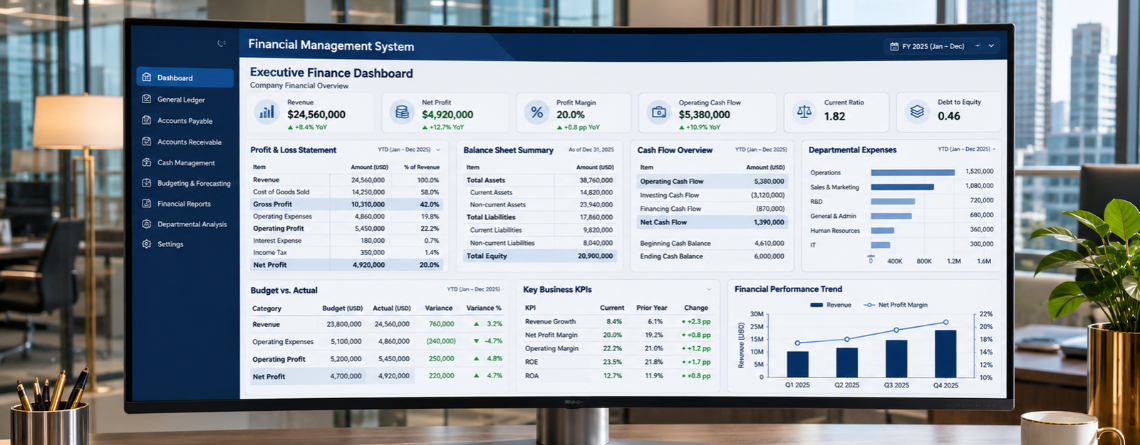
Executive P&L and balance sheet packs (with variance analysis)
Instead of formatting monthly board packs by hand, automated pipelines pull trial balance data on a fixed schedule, map accounts into executive summaries, and flag material variances against prior periods or approved budgets.
Cash flow forecasts and burn rate dashboards
Static cash reports go stale the moment an invoice clears. Automated dashboards pair live QuickBooks bank balances with open receivables and upcoming payables to keep a rolling 13-week cash runway model. Strong accounts payable visibility matters here. When unapproved or pending vendor bills sit outside the ledger, short-term cash outflow projections lose credibility quickly.
Departmental spend and budget-vs-actual scorecards
Department heads need continuous visibility into their burn rate without full administrative access to QuickBooks. Automated workflows generate tailored departmental P&Ls, apply role-based permissions, and send scheduled scorecards directly to budget owners.
KPI and unit economics summaries
Board-ready reporting rarely relies on general ledger data alone. QuickBooks financial reporting automation layers blend QuickBooks revenue and cost-of-goods-sold figures with operational data from billing or CRM systems to calculate gross margin by cohort, customer acquisition payback, and revenue per employee.
How AI agents upgrade QuickBooks financial reporting
Traditional business intelligence connectors move numbers from QuickBooks into charts, but people still handle the interpretation and data cleanup. Modern AI accounting agents close that gap at three layers.
Pre-report data hygiene and reconciliation
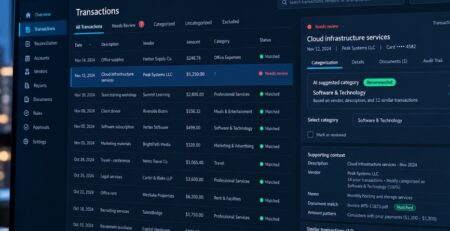
A report is only as reliable as the ledger behind it. Before generating management packs, AI agents monitor incoming feeds to support automated transaction categorization and continuous bank and credit card reconciliation. Because they resolve routine coding discrepancies daily, the ledger stays ready for reporting all month, not just during close week.
Automated variance commentary (narrative reporting)
Instead of controllers writing variance notes from scratch, AI agents inspect the general ledger transactions behind a threshold breach and draft concise, plain-English explanations. A note might say, for instance, that legal expenses rose by $14,500 because of two one-time contract review invoices from outside counsel.
Natural language querying for leadership
When founders or CFOs have ad-hoc questions during board prep, such as comparing Q3 gross margin with and without one-time implementation contractors, conversational reporting interfaces query structured ledger views directly. They return verifiable answers in seconds rather than days.
4-Step architecture for automating your management reports
Dependable automated management reports need a disciplined data architecture before you connect any AI model. At E2ESP, when we architect custom financial workflows around existing accounting stacks, we structure implementation in four technical stages.
Step 1: Standardize your Chart of Accounts and class tracking
QuickBooks financial reporting automation amplifies whatever structure your ledger already has. Before automating outputs, standardize your Chart of Accounts, enforce mandatory Class, Location, or Project tagging on transactions, and align your existing accounting workflows so upstream entries carry consistent metadata.
Step 2: Connect your data layer (API vs. custom AI agent)
Off-the-shelf reporting connectors work well for standard templates. Organizations with complex multi-entity eliminations, custom revenue recognition rules, or proprietary KPI logic often outgrow rigid SaaS tools. Weighing those trade-offs is central to choosing between off-the-shelf tools and a custom QuickBooks AI agent built directly over the QuickBooks API and a governed data warehouse.
Step 3: Build automated anomaly and exception checks
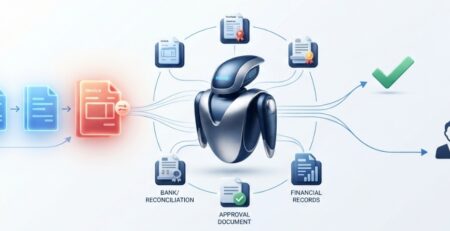
Never let an automated pipeline send unverified numbers to executives. Configure deterministic validation gates that pause report delivery and alert the accounting team when suspense accounts carry a balance, when uncategorized expenses exceed a materiality threshold, or when flagging accounting exceptions before reports go out detects duplicate postings.
Step 4: Establish human sign-off and validation rules
Probabilistic AI models should draft commentary and surface anomalies, but they should never finalize statutory or board-level financials on their own. Pair automated data assembly with strict human-in-the-loop oversight and clear protocols for validating AI-generated financial outputs. That way, the controller reviews commentary and approves release before leadership sees the pack.
Common pitfalls to avoid when automating financial reports
Automating broken spreadsheet logic. Rebuilding convoluted, fragile Excel workarounds inside a custom reporting pipeline carries the technical debt over. Simplify KPI definitions and account mappings first.
Ignoring cut-off timing. If you schedule automated weekly or monthly packs to send before QuickBooks accounts payable automation approvals, credit card feeds, or payroll accruals settle, you get conflicting report versions and lose executive trust.
Over-sharing granular ledger data. Automated reports sent without strict role-based access controls can expose payroll lines, executive compensation, or vendor contract terms to unauthorized recipients.

Moving from manual assembly to strategic finance
QuickBooks Financial Reporting Automation takes the mechanical export, formatting, and detective work off finance leaders’ plates while they stay in charge of the reporting process. When clean ledger pipelines, exception gates, and AI-assisted variance analysis handle the heavy lifting, controllers and CFOs have time to interpret performance and guide capital allocation.
Ready to streamline your finance workflows?
Whether you are eliminating manual reporting bottlenecks or integrating upstream payables and approvals into a unified QuickBooks architecture, E2ESP designs custom AI and automation systems tailored to how your business actually operates.